120+ Free Visitor Management Features
I built VisitorLog because enterprise visitor management shouldn't cost enterprise money. Every feature on this page works on the free plan, and the handful that don't carry real external costs that I pass through without markup.
Nonprofit, church, or charity? I'll work with you.
Visitor Check-In
Each facility gets a unique QR code that visitors scan to check in from their phone. No app download, no special hardware — just scan, fill in a short form, and check in. The same QR code handles checkout, and configurable auto-close rules catch visitors who forget.
- QR Code Check-In — Visitors scan a facility QR code with their phone camera — no app required
- Manual Check-In — Front desk staff can check in visitors directly from the dashboard
- Pre-Registration — Register expected visitors in advance so their check-in is faster
- Self-Service Checkout — Visitors check out by scanning the same QR code or tapping a link in their confirmation email
- Visitor Types — Categorize visitors as contractors, clients, vendors, interviewees, or custom types
- Custom Fields — Add facility-specific questions to the check-in form with configurable field types
Notifications & Alerts
Staff receive instant email and SMS alerts when visitors check in or out. Notification routing is fully configurable per facility — choose which roles get notified, set checkout reminders, and schedule daily digest summaries.
- Email Alerts — Instant email notifications on check-in, checkout, and overdue visitors
- SMS Notifications — Text message alerts via Twilio with per-facility phone numbers and credentials
- Custom Email Templates — Design branded notifications with the built-in WYSIWYG editor
- Daily Digest — Automated daily summary emails with visitor counts and activity highlights
- Checkout Reminders — Automatic reminders sent to visitors who overstay their expected visit duration
- Host Approval via SMS — Hosts approve or deny visitors with a text reply — APPROVE or DENY
Security & Screening
Three configurable security tiers let you match screening to your facility requirements. Standard mode captures basic visitor info. Enhanced adds ID verification and NDA signatures. High Security requires host authorization before entry.
- Three Security Modes — Switch between Standard, Enhanced, and High Security per facility at any time
- NDA Signature Capture — Visitors read and digitally sign an NDA during check-in with drawn signatures
- Host Authorization — Designated hosts approve or deny visitors via email or SMS before entry is granted
- ID Verification — Capture 7+ document types including passport, driver license, military, and CAC
- Escort Tracking — Assign escorts to visitors and track escort activity with a dedicated role
- Vehicle Capture — Record vehicle make, model, color, and plate number for parking and security logs
Analytics & Reports
The analytics dashboard gives you traffic trends, peak hours heatmaps, visitor type breakdowns, and facility comparisons. Schedule reports to land in your inbox daily, weekly, or monthly — or export as CSV for external analysis.
- Traffic Trends — Daily, weekly, and monthly visitor volume with interactive line charts
- Peak Hours Heatmap — Hourly visitor distribution to plan staffing and security coverage
- Visitor Breakdowns — Filter by visitor type, visit reason, company, or host for detailed insights
- Facility Comparison — Compare visitor volumes across all locations from a single dashboard
- Scheduled Reports — Automated reports delivered by email on a daily, weekly, or monthly schedule
- CSV Export — Export visitor data in standard formats for compliance reporting or external tools
Kiosk & Digital Signage
A dedicated Android kiosk app turns any Android 6.0+ device into a self-service check-in terminal. Customizable welcome slides rotate when the kiosk is idle, and dual display support adds a tactical dashboard for security or reception staff.
- Android Kiosk App — Free app for any Android 6.0+ tablet or signage display — no proprietary hardware
- Welcome Slideshow — Customizable rotating slides with per-slide timing and facility branding
- Dual Display Support — Connect a second screen for a live tactical dashboard alongside the check-in display
- Tactical Dashboard — Real-time active visitor list with check-in times, durations, and one-tap checkout
- Device Pairing — Pair devices to facilities using a simple site code — no technical setup
- OTA Updates — Push app updates and configuration changes to devices over the air
Badge Preview
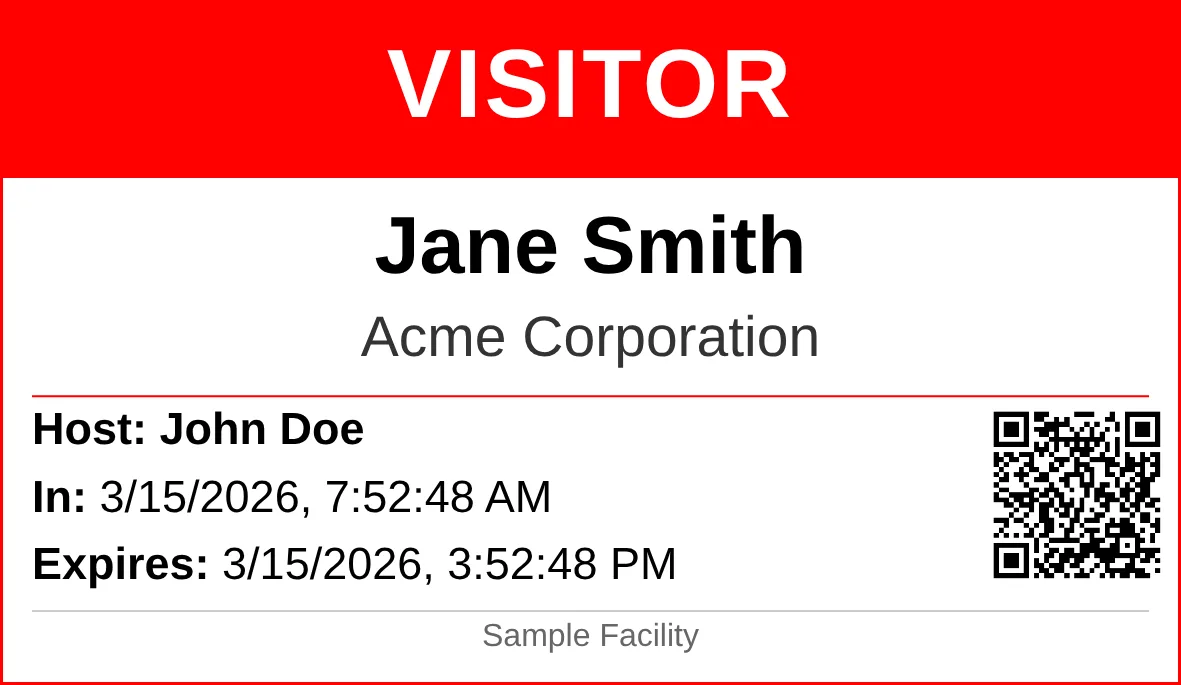
Rendered at 300 DPI with validation QR code
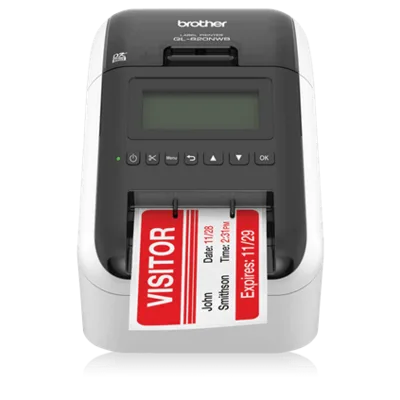
Brother QL-820NWB
Connects over USB, Wi-Fi, or Bluetooth. Prints on 62mm continuous roll labels with DK-2251 stock for crisp red and black output.
Badge Printing
Every visitor gets a polished, branded badge printed instantly at check-in. Silent printing fires automatically through QZ Tray with zero dialogs, badges render at 300 DPI, and each facility can have its own template with per-field typography controls and two-color printing on Brother QL label printers.
- Silent Printing via QZ Tray — Badges print automatically with no browser dialogs or manual intervention
- Auto-Print on Check-In — Every visitor gets a badge the second they check in, no staff action needed
- Two-Color Red & Black — Red and black printing on Brother DK-2251 labels makes warning labels and visitor types stand out
- 300 DPI Rendering — Sharp text, clean logos, and scannable QR codes every time
- Per-Field Typography — Control font, size, weight, and color of each badge field to match your brand
- Per-Facility Templates — Each facility gets its own badge layout, so headquarters and a warehouse look different
- Validation QR Code — Every badge includes a scannable QR code for instant visitor verification
- Badge Expiration — Set expiration from 1 to 72 hours with automatic validation failure on expired badges
Integrations & API
A full REST API (v3) gives you programmatic access to visitors, facilities, settings, and analytics. Webhooks fire on check-in and checkout events. SSO supports Google, Microsoft, and any SAML 2.0 identity provider.
- REST API v3 — Bearer token auth with scoped permissions, rate limiting, and IP allowlisting
- Webhooks — HMAC-SHA256 signed payloads on check-in and checkout with automatic retry
- Google & Microsoft SSO — One-click sign-in through Google or Microsoft accounts
- SAML 2.0 — Enterprise SSO with Azure AD, Okta, or any SAML 2.0 identity provider
- Employee Directory Sync — Automatically sync host lists from external directory providers
Delivery Management
Track packages and deliveries alongside visitors. Log incoming packages with carrier, tracking number, and recipient. Recipients get notified automatically and the delivery record closes when the package is picked up.
- Package Tracking — Log carrier, tracking number, recipient, and delivery location for each package
- Recipient Notifications — Automatic email or SMS alerts to recipients when their package arrives
- Pickup Confirmation — Record who picked up the package and when, closing the delivery record
- Auto-Dispose — Configurable rules for packages that go uncollected past a set period
- Delivery Areas — Organize delivery tracking by building area, floor, or mailroom
Compliance & Audit
Every visitor action is logged with timestamps, IP addresses, and user attribution in an immutable audit trail. VisitorLog maps to physical security controls required by CMMC, NIST 800-171, HIPAA, ISO 27001, FedRAMP, and PCI DSS.
- Immutable Audit Trail — Every action logged with timestamps and user attribution — entries cannot be edited or deleted
- Compliance Mapping — Maps to CMMC 2.0, NIST 800-171, HIPAA, ISO 27001, FedRAMP, and PCI DSS controls
- Data Retention Policies — Configurable retention periods with automatic pruning of expired records
- Tenant Isolation — Physically separate SQLite databases per organization — not row-level filtering
- GDPR Data Controls — Full data export and organization-wide data wipe with password re-verification
Hospitality Mode
Switch any facility to hospitality mode for restaurants, bars, cafes, and hotels. Manage digital menus with daypart scheduling, track guests with a built-in registry, and let customers browse your menu by scanning a QR code.
- Facility Mode Toggle — Switch between visitor management and hospitality mode per facility
- Menu Management — Create and organize menu categories, items, prices, and dietary labels
- Daypart Scheduling — Set different menus for breakfast, lunch, dinner, and custom time periods
- Guest Registry — Track guest visits with a lightweight registry for repeat customer recognition
- Public QR Menu — Guests scan a QR code to view the full menu on their phone — no app needed
- Hospitality Analytics — Guest traffic, menu item popularity, and peak hours tailored for food service
Get started free
No credit card, no trial period, no per-user fees. Create your account and start managing visitors in minutes.