Free Visitor Management System
Know exactly who is on your site, at every entrance, on every device. We give you QR check-in, badge printing, self-service kiosks, live SMS and email alerts, and a full audit trail. Free for up to two facilities, no credit card, no trial clock.
Get started today. No credit card required.Meets requirements for
Visitor Management Features
A full visitor management platform with no per-user pricing. Every core feature is free for your first facility.
QR Code Check-In
Visitors scan a facility QR code, fill out a short form, and check themselves in. No app download, no hardware. Visitors receive a unique checkout link by email or SMS for one-tap self-service checkout.
Real-Time Notifications
Email and SMS alerts fire the moment a visitor checks in or out. Configure routing per facility by role, send checkout reminders, and flag overdue visits.
User & Role Management
Four roles with fine-grained permissions: Owner, Admin, User, and Escort. Invite teammates, scope data access, and lock down notification preferences.
Complete Audit Trail
We log every visitor action with timestamps, IP addresses, and user attribution. Filter the audit log on screen or export to CSV for compliance reviews.
Custom Branding
Your logo, your colors, your identity. A full theme editor covers light and dark modes, custom CSS, and per-tenant branding across QR pages and emails.
Multi-Facility Support
Run multiple buildings, floors, or locations from one account. Each facility gets its own QR code, notification settings, and security policies. Paid plans add facilities beyond the free tier, contact us to upgrade.
Visitor Security & Screening
Pick the screening level that matches your facility requirements. Switch modes per facility at any time.
Standard
Name, company, host, and visit reason. A clean fit for offices and coworking spaces.
Enhanced
Adds ID verification, NDA signatures, and emergency contact collection. Built for regulated industries.
High Security
Full identity capture with citizenship, vehicle details, escort requirements, and host authorization before entry.
Security Capabilities
- ID scanning for 7+ document types (passport, driver license, military, CAC, PIV, TWIC, state ID)
- Digital NDA signatures with WYSIWYG template editor
- Host authorization via email or SMS before entry
- Escort assignment and escort role tracking
- Vehicle make, model, color, and plate number capture
- Emergency contact and company information
- Citizenship and country-of-origin recording
- Periodic check-in requirements for long-duration visits
Integrations & Automation
Plug visitor data into the systems you already run. Every integration is included free.
REST API v3
- 16 granular permission scopes
- Interactive Swagger UI documentation
- OpenAPI 3.0 specification
- Per-key rate limiting and IP allowlists
Webhooks
- HMAC-SHA256 signed payloads
- Custom payload templates
- Automatic retry with exponential backoff
- Delivery log with detailed status history
SMS via Twilio
- Per-facility Twilio credentials
- Bidirectional host approval via SMS
- Customizable message templates
- Delivery tracking and retry queue
SSO & SAML 2.0
- Google and Microsoft OAuth
- Enterprise SAML 2.0 with any IdP
- 4 registration policies (open to closed)
- Domain-restricted auto-provisioning
Analytics & Reporting
See your visitor traffic at a glance with live dashboards and scheduled reports.
Today
24
+12%
This Week
142
+8%
Avg Duration
47m
-3%
Weekly Traffic
Hourly Heatmap
See your visitor traffic at a glance with live dashboards and scheduled reports.
- Traffic trends with daily, weekly, and monthly views
- Hourly heatmap showing peak visitor times
- Visitor type and visit reason breakdowns
- Facility comparison across all locations
- Scheduled reports delivered daily, weekly, or monthly
- CSV export and print-ready formatting
Delivery Management
Track packages, notify recipients, and close the loop on every delivery that hits your facility.
Package Logging
Record every delivery with carrier, tracking number, and recipient details.
Delivery Areas
Set up mailrooms, loading docks, and reception desks as named zones.
Status Workflow
Follow packages from received to picked up with a full status history.
Pickup Reminders
We send email and SMS reminders until the package gets collected.
Auto-Dispose
Set rules to auto-dispose unclaimed packages after a defined holding period.
Signature Capture
A digital signature at pickup proves delivery to the right recipient.
Telemetry & DispatchComing Soon
Track visitor location live with UWB badges and dispatch from a single console.
- UWB badge tracking for real-time indoor positioning
- Dispatch console with live floor plan view
- Geofence zones with configurable boundaries
- Zone breach and dwell-time alerts
- SOS panic button for visitor emergencies
- Device inventory and battery monitoring
- Broadcast messaging to all active badges
Dispatch Console
Self-Service Kiosk and Digital Signage
Turn any Android tablet into a visitor check-in kiosk. Add rotating welcome slides and a live operations dashboard for your lobby.
Dual Display Mode
Acme Corp
Welcome
Visitor Policy
All visitors must check in
Please have your ID ready
Acme Corp
Welcome
visitorlog.io
Display 1: Check-in
J. Smith
Vendor · M. Lee · 1:30
A. Chen
Client · R. Davis · 2:10
K. Patel
Contractor · S. Jones · 2:40
Display 2: Tactical
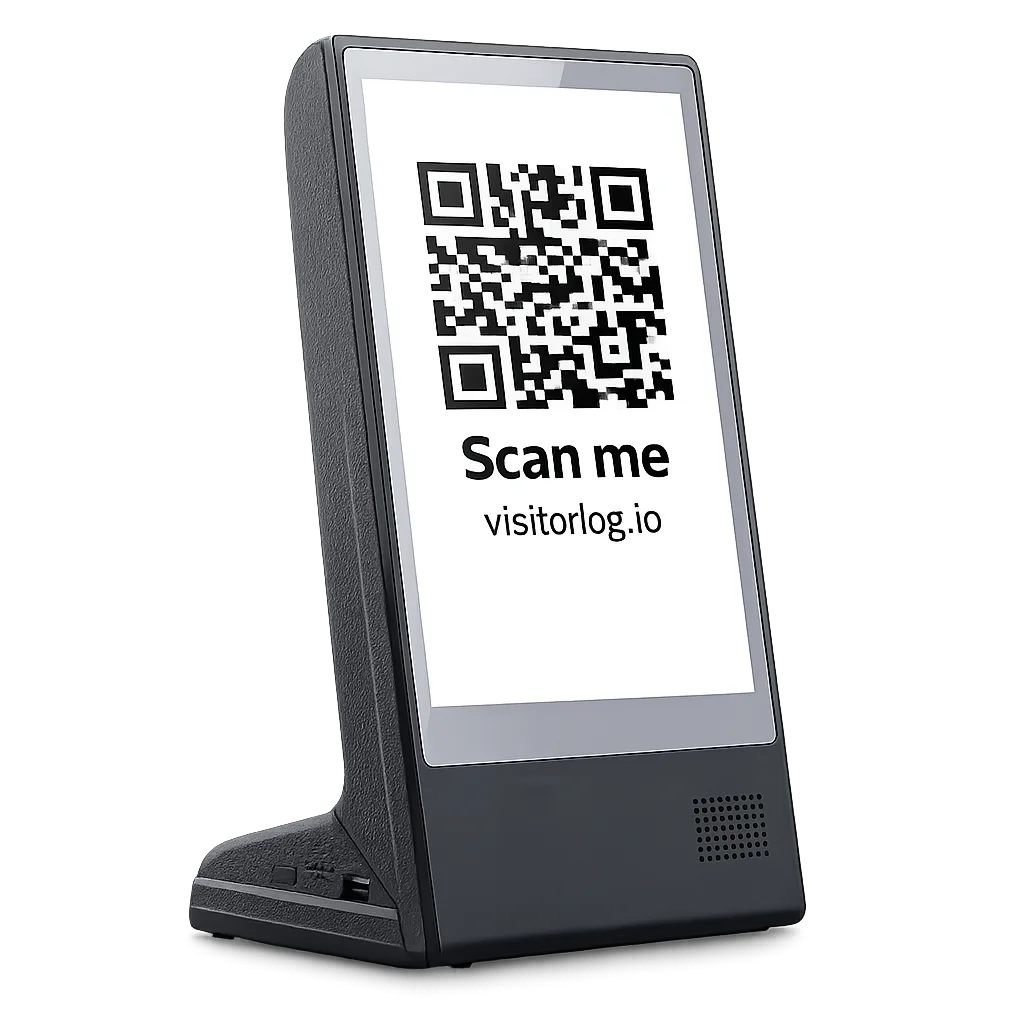
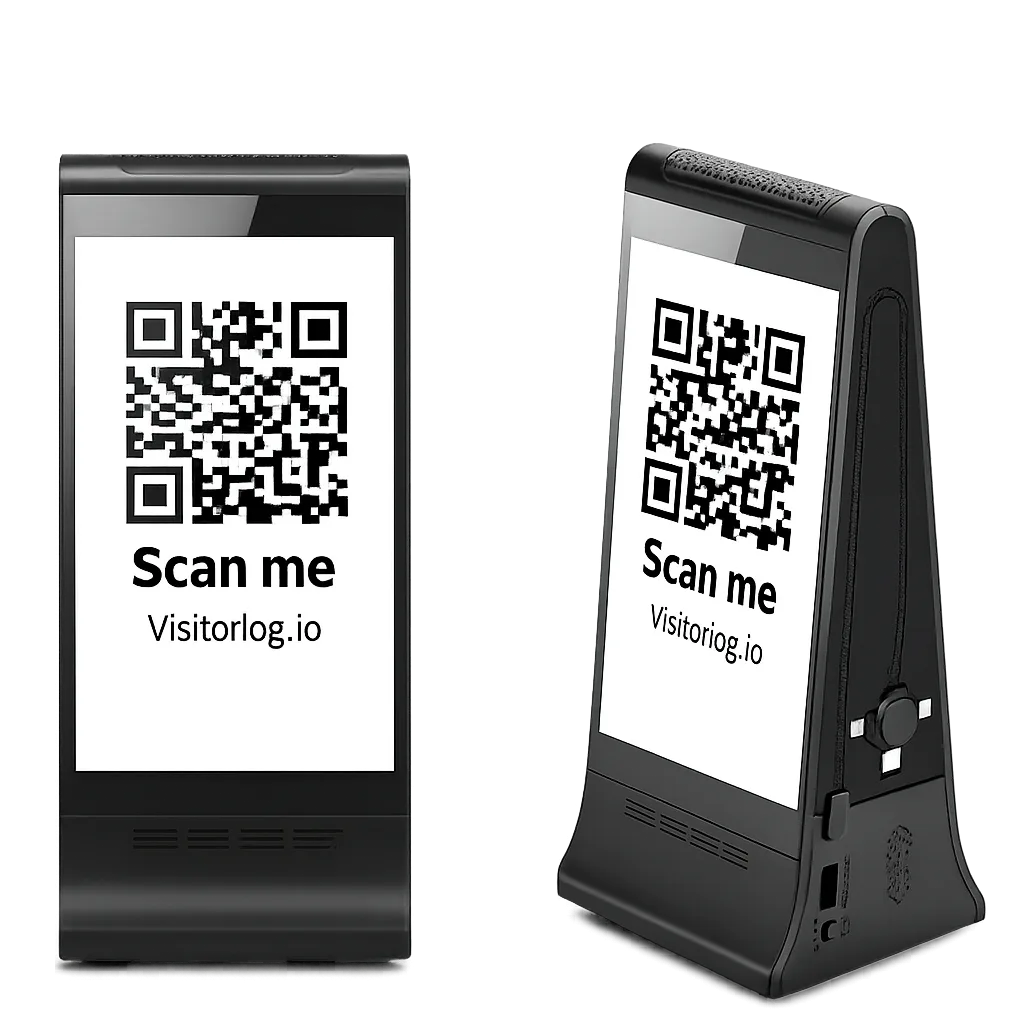
Works with a wide range of Android signage hardware
- Touchscreen self-service check-in on any Android 10.0+ device, with staff one-click checkout from the tactical dashboard
- Bring your own device. Any Android tablet or commercial signage display you already own works.
- Browser kiosk mode runs on iPad, Android tablets, Chromebooks, macOS, Windows, and Linux — no app install required
- Rotating welcome slides play automatically while the kiosk sits idle
- Dual-display support runs a second screen for security monitoring or reception
- A tactical dashboard shows active visitors, check-in times, and visit duration as it happens
- Built-in templates for the check-in screen and the tactical display, fully customizable to match your brand
- Walk-in visitors without a phone can check in at the kiosk with one tap
We recommend the below devices, but many Android 10.0+ tablets or signage displays work as a VisitorLog kiosk. A few options are:
Android 10.0+ required. We do not support iOS kiosks at this time. Performance and compatibility may vary. We recommend the WeADS devices above.
Professional Badge Printing the Moment a Visitor Arrives
Every visitor gets a polished, branded badge printed at check-in. Our badge system handles layout, typography, and silent printing, so your front desk never fumbles with handwritten labels again.
Badge Preview
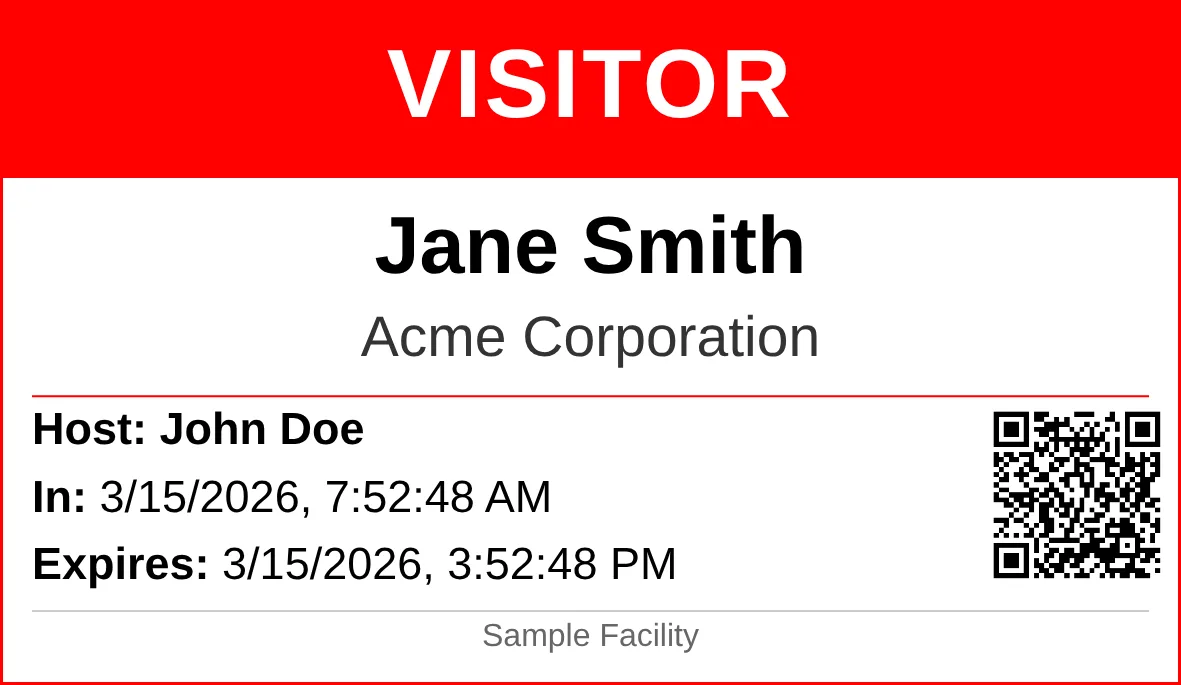
Rendered at 300 DPI with validation QR code
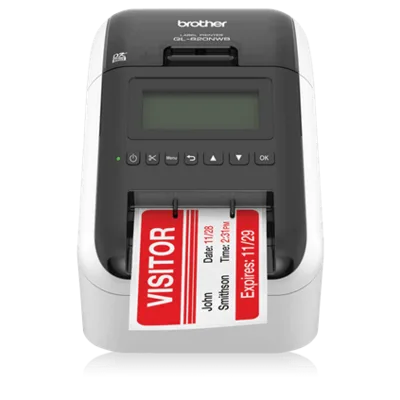
Brother QL-820NWB
Connects over USB, Wi-Fi, or Bluetooth. Prints on 62mm continuous roll labels and supports DK-2251 stock for crisp red and black output. One roll handles hundreds of badges before you swap it out.
Printing & Hardware
- Badges print silently through QZ Tray. No pop-ups, no print dialogs, no slowdown at the front desk.
- Turn on auto-print and every visitor gets a badge the second they check in. No staff action needed.
- Two-color red and black printing makes warning labels and visitor types impossible to miss at a glance.
- When QZ Tray is not installed, we fall back to standard browser printing so you are never stuck without badges.
- Lost or damaged badge? Reprint any visitor's badge from the dashboard in one click.
Design & Customization
- Badges render at 300 DPI for sharp text, clean logos, and scannable QR codes every time.
- Control the font, size, weight, and color of each field to match your brand exactly.
- Pick portrait or landscape orientation based on your label size and layout.
- Each facility gets its own badge template, so a corporate headquarters and a warehouse can look completely different.
Security & Compliance
- A unique validation QR code prints on every badge, so staff can verify any visitor with a quick scan.
- Set badge expiration anywhere from 1 to 72 hours. Expired badges fail validation automatically.
- Visitors flagged for escort get a bold "REQUIRES ESCORT" banner printed on the badge, visible from across the room.
Compliance-Ready Visitor Tracking
Every feature maps directly to physical security controls required by the major compliance frameworks.
CMMC 2.0
Physical access controls, visitor logging, and audit trail evidence for defense contractors.
NIST 800-171
CUI protection through visitor screening, escort tracking, and access records.
HIPAA
Facility access controls and audit logging for healthcare sites that handle PHI.
ISO 27001
Physical security controls, visitor management procedures, and access governance.
FedRAMP
Physical and personnel security for federal data processing facilities.
PCI DSS
Visitor logs, ID requirements, and restricted-area access controls for cardholder data environments.
Up and Running in Minutes
Three steps from sign-up to your first check-in. No hardware, no contracts, no setup fees.
Create Your Account
Register for free, name your organization, and add your facility. Pick your notification preferences and security mode.
Print Your QR Code
Your facility gets a unique QR code. Print it and post it at the entrance, reception desk, or security checkpoint.
Track Every Visitor
Visitors scan, fill in a short form, and check in. Your team gets real-time alerts and every visit lands in the audit log.
Frequently Asked Questions
The answers folks ask us about most often.
What is VisitorLog.io?
How does QR code check-in work?
Is VisitorLog.io free?
What security features does VisitorLog offer?
Does VisitorLog support compliance requirements?
Does VisitorLog support self-service check-in kiosks?
What hardware do I need for a visitor kiosk?
What do I need to print visitor badges?
Start managing visitors today
No credit card, no trial period, no feature limits. A complete visitor management system, free for your first facility.
Create Your Free Account