
Office Delivery Management System
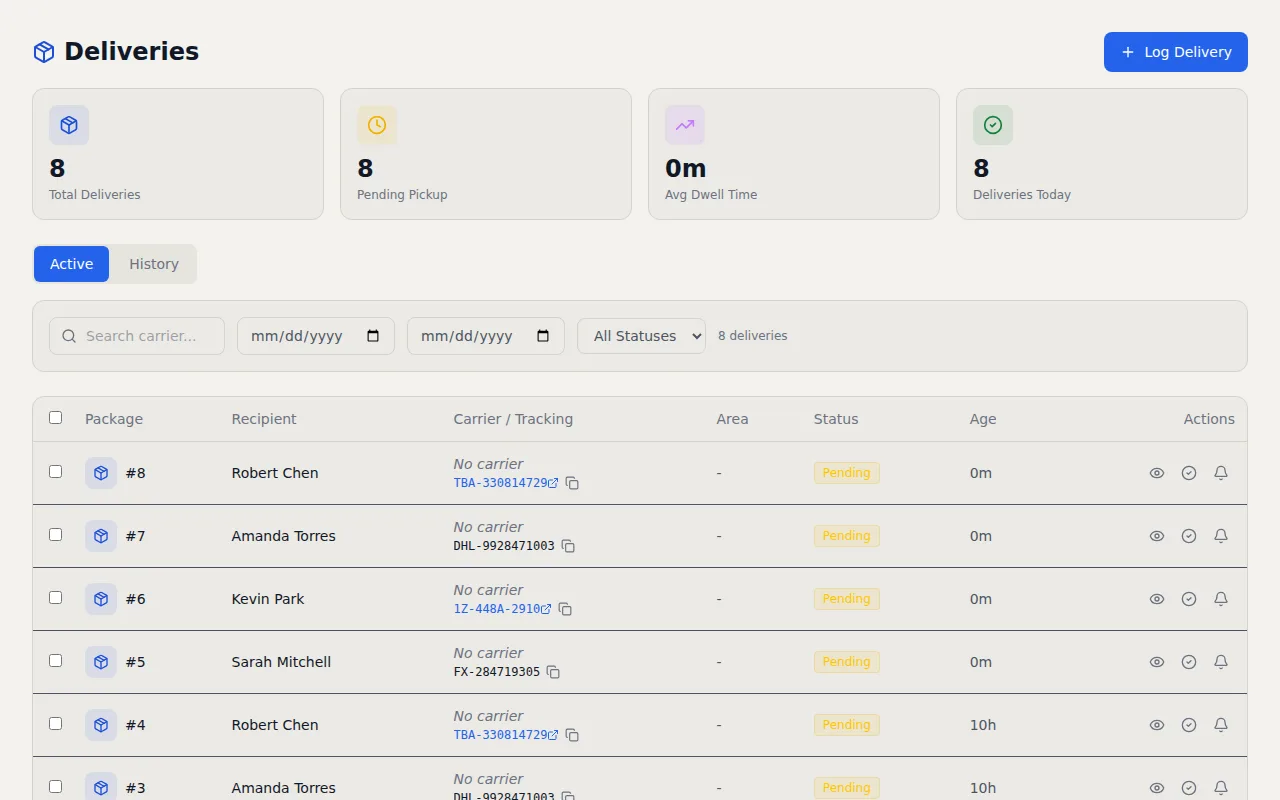
Track packages and deliveries right alongside your visitor log. Log incoming packages, notify recipients automatically, and close the record when the package is picked up.
Key Capabilities
- Package Tracking — Log carrier, tracking number, recipient, and delivery location
- Recipient Notifications — Automatic email or SMS alerts to recipients when a package arrives
- Pickup Confirmation — Record who picked up the package and when
- Auto-Dispose — Configurable rules for uncollected packages past a set period
- Delivery Areas — Organize tracking by building area, floor, or mailroom
How It Works
Packages pile up. Someone drops off a FedEx box at reception, the receptionist sets it behind the desk, and three days later the recipient still has no idea it arrived. Meanwhile the receptionist is juggling visitor check ins, phone calls, and five other packages that came in since then. I added delivery management to VisitorLog because package tracking is fundamentally the same problem as visitor tracking. Something arrives, someone needs to know about it, and you need a record of when it was collected.
When a package arrives, front desk staff log the carrier (FedEx, UPS, USPS, DHL, Amazon, or any other), the tracking number, and the recipient. They can also note the delivery area so packages are organized by building, floor, or mailroom location. The moment that entry is saved, the recipient gets an automatic email or SMS notification letting them know their package is waiting. No sticky notes on monitors, no Slack messages that get buried, no walking around the office asking "did anyone order something?" The notification includes the carrier name and where the package is located, so the recipient has everything they need to go grab it.
Pickup confirmation closes the loop. When the recipient collects their package, staff record the pickup and the delivery record is marked as complete with a timestamp and the name of who picked it up. This creates a clean chain of custody from arrival to collection. For packages that sit uncollected, auto dispose rules kick in after a configurable number of days. The system can flag abandoned packages for return to sender or disposal, keeping your mailroom from becoming a warehouse of forgotten deliveries. Delivery reminders can also nudge recipients who have not picked up their package after a set period.
Because delivery management lives inside VisitorLog, all delivery activity feeds into the same audit trail and analytics dashboard as your visitor data. You can see daily delivery volumes, identify peak delivery times, and export delivery records alongside visitor logs for facilities reporting. Reception staff manage everything from one interface instead of switching between a visitor management system and a separate package tracker. For offices that receive dozens of packages per day, having one place to manage both visitors and deliveries saves real time at the front desk and gives facilities managers a complete picture of lobby activity. Your reception team learns one tool instead of two, and your reports cover everything that comes through the door.
Frequently Asked Questions
How are recipients notified when a package arrives?
What happens to packages that nobody picks up?
Can I track deliveries by building area or floor?
Related Features
Visitor Notification System
Real time email and SMS notifications the instant a visitor checks in or out. Custom templates, daily digests, checkout reminders, and host approval by text reply.
Visitor Analytics Dashboard
Traffic trends, peak hours heatmaps, visitor type breakdowns, and facility comparisons. Schedule reports to your inbox or export to CSV.
QR Code Visitor Check In
Every facility gets a unique QR code. Visitors scan it with their phone camera, fill a short form, and check in. The same code handles checkout too.
Try it free
No credit card, no trial period. Create your account and start managing visitors in minutes.