Visitor Management API
A full REST API with bearer token auth, scoped permissions, and webhooks that fire on every check in and checkout. Integrate VisitorLog with anything.
Key Capabilities
- REST API v3 — Bearer token auth with scoped permissions, rate limiting, and IP allowlisting
- Webhooks — HMAC-SHA256 signed payloads on check-in and checkout with automatic retry
- Google & Microsoft SSO — One-click sign-in through Google or Microsoft accounts
- SAML 2.0 — Enterprise SSO with Azure AD, Okta, or any SAML 2.0 provider
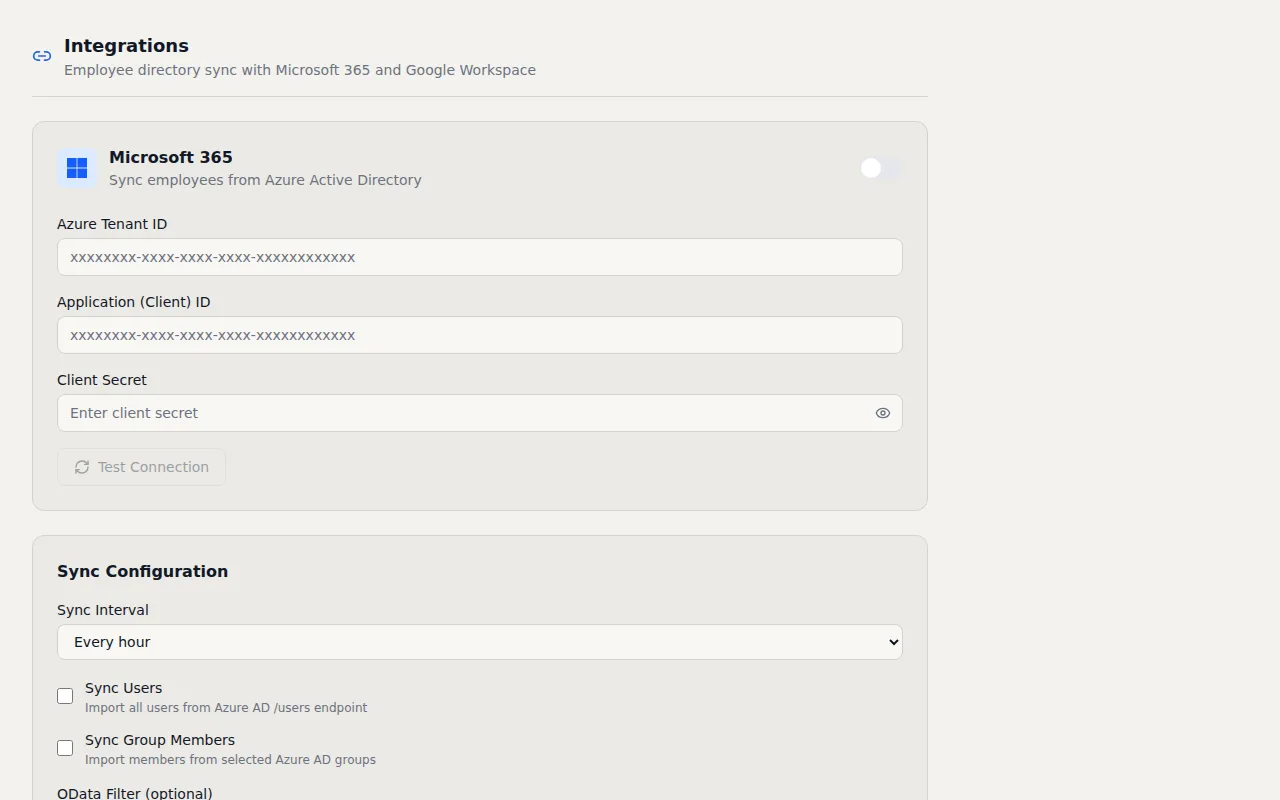
- Employee Directory Sync — Automatically sync host lists from external directory providers
How It Works
Visitor management does not exist in a vacuum. Your access control system, HR platform, security operations center, and facilities team all need visibility into who is entering your buildings. I built the VisitorLog API to make those connections possible without workarounds, CSV imports, or manual data entry.
The REST API (v3) gives you programmatic access to visitors, facilities, settings, kiosk devices, and analytics. Authentication uses bearer tokens with scoped permissions so you can create a token that reads visitor data but cannot modify settings, or a token that manages facilities but has no access to audit logs. Rate limiting and IP allowlisting protect against abuse and ensure your API tokens only work from expected network locations. For development teams building custom integrations, the API follows standard REST conventions and returns clean JSON responses with descriptive error messages. Getting started takes minutes, and the scoped permission model means you can hand a limited token to a contractor or integration partner without worrying about them accessing data outside their scope.
Webhooks deliver real time event data to any endpoint you specify. When a visitor checks in or out, VisitorLog sends an HTTP POST to your configured URL with the full event payload signed using HMAC SHA256. Your receiving system can verify the signature to confirm the webhook came from VisitorLog and was not tampered with in transit. If delivery fails, the system retries automatically with exponential backoff so transient network issues do not cause missed events. Webhook payloads include the visitor's name, company, host, facility, timestamps, and all custom field data so your downstream systems have complete context without needing to make a follow up API call.
For authentication, VisitorLog supports Google OAuth, Microsoft OAuth, and full SAML 2.0 single sign on. SAML works with Azure AD, Okta, OneLogin, or any SAML 2.0 identity provider. Your team signs in with their existing corporate credentials and never needs a separate VisitorLog password. Employee directory sync pulls host lists from your identity provider automatically so the host dropdown in the check in form always reflects your current staff. When someone leaves the company, they disappear from the host list on the next sync cycle without manual intervention. The combination of SSO, directory sync, and the REST API means VisitorLog fits into your existing infrastructure instead of creating another silo your IT team has to manage separately.
Frequently Asked Questions
What authentication methods does the API support?
How do webhooks work for visitor events?
Can I connect VisitorLog to my company directory for host lists?
Related Features
Visitor Management Audit Trail
Every visitor action logged with timestamps, IP addresses, and user attribution. Immutable records that map to CMMC 2.0, NIST 800 171, HIPAA, ISO 27001, FedRAMP, and PCI DSS controls.
Visitor Notification System
Real time email and SMS notifications the instant a visitor checks in or out. Custom templates, daily digests, checkout reminders, and host approval by text reply.
Visitor Analytics Dashboard
Traffic trends, peak hours heatmaps, visitor type breakdowns, and facility comparisons. Schedule reports to your inbox or export to CSV.
Try it free
No credit card, no trial period. Create your account and start managing visitors in minutes.