Visitor Security Screening
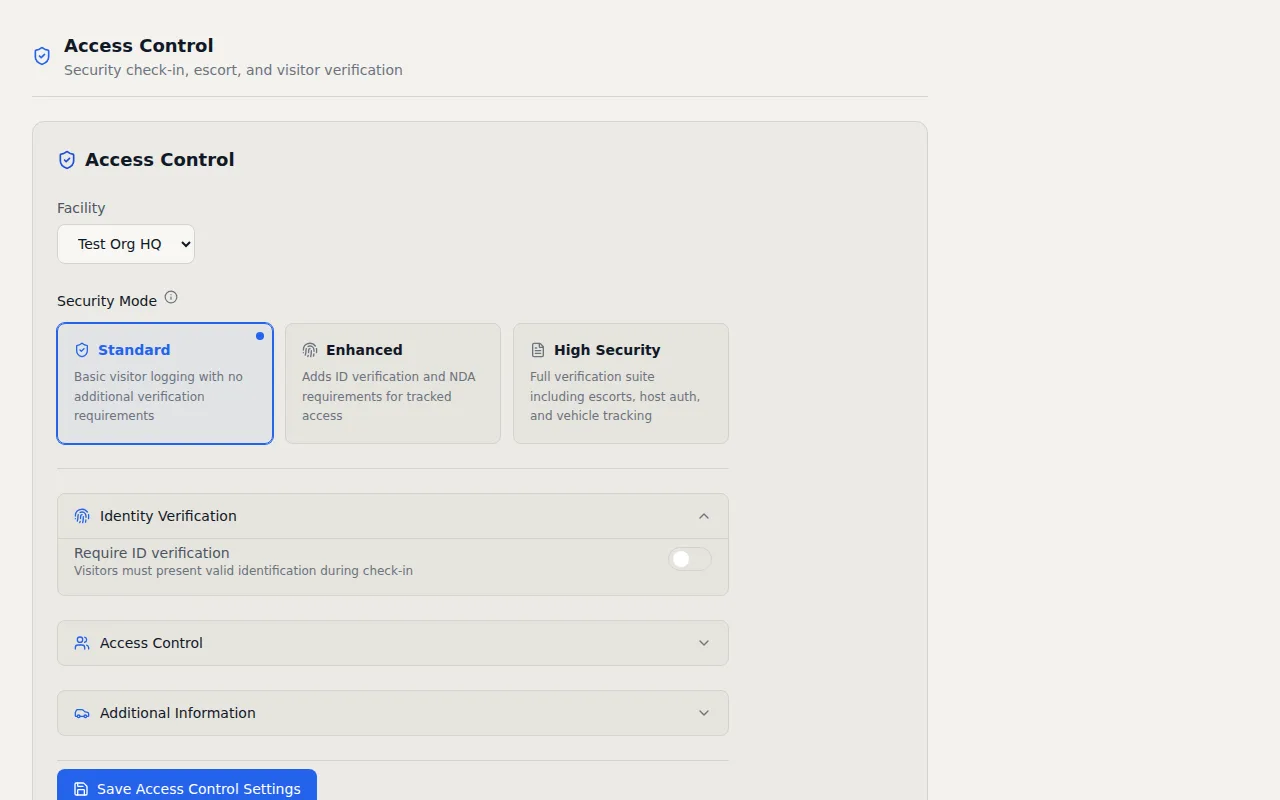
Three configurable security tiers that match screening depth to your facility requirements. From basic sign in to full ID verification with NDA signatures and mandatory host approval.
Key Capabilities
- Three Security Modes — Switch between Standard, Enhanced, and High Security per facility
- NDA Signature Capture — Visitors read and digitally sign an NDA during check-in
- Host Authorization — Hosts approve or deny visitors via email or SMS before entry
- ID Verification — Capture 7+ document types including passport, driver license, and CAC
- Escort Tracking — Assign escorts to visitors and track escort activity
- Vehicle Capture — Record vehicle make, model, color, and plate number
How It Works
Not every building needs the same level of visitor screening. A coworking space has different security requirements than a defense contractor. I designed VisitorLog's visitor security screening with three configurable tiers so you can match the check in process to your actual risk profile, facility by facility. You pick the level that fits and change it anytime.
Standard mode captures basic visitor information like name, company, host, and reason for visit. This works well for general office environments where you want a record of who entered the building without creating a bottleneck at the front door. The check in form stays short and visitors move through quickly. Enhanced mode adds ID verification and NDA signature capture. Visitors select from seven document types (including passport, driver license, military ID, and CAC) and acknowledge their identification during check in. If your facility requires a nondisclosure agreement, visitors read the NDA text on screen and provide a drawn signature with their finger or stylus. The signature is stored alongside their check in record for legal and audit purposes. This tier works well for tech companies, law firms, and any environment where intellectual property protection matters.
High security mode goes further by requiring host authorization before a visitor can enter. When someone checks in under high security, the named host receives a notification by email or SMS and must explicitly approve or deny the visit. Until the host responds, the visitor waits. There is no automatic entry. This tier also supports escort tracking with a dedicated escort role. Assigned escorts receive notifications when their visitor arrives and the system tracks the escort assignment alongside the visit record. For defense contractors and government facilities where CMMC or NIST 800 171 compliance requires visitor escort procedures, this built in tracking satisfies the documentation requirement.
Vehicle capture is available at all tiers and records make, model, color, and license plate number. For facilities with parking management requirements or sites where vehicle identification is part of the security protocol, this data feeds into the audit trail alongside every other visitor action. Each facility configures its own security tier independently, so your headquarters can run high security while regional offices use standard mode. Switching tiers takes one click in settings and applies immediately to the next visitor who checks in. There is no downtime, no reconfiguration, and no need to retrain your front desk staff. The screening form adjusts itself automatically.
Frequently Asked Questions
What types of ID can visitors present for verification?
How does the NDA signature capture work during check in?
Can different facilities use different security screening levels?
Related Features
Visitor Management Audit Trail
Every visitor action logged with timestamps, IP addresses, and user attribution. Immutable records that map to CMMC 2.0, NIST 800 171, HIPAA, ISO 27001, FedRAMP, and PCI DSS controls.
Visitor Notification System
Real time email and SMS notifications the instant a visitor checks in or out. Custom templates, daily digests, checkout reminders, and host approval by text reply.
Visitor Check In Kiosk
Turn any Android 6.0+ tablet into a self service check in kiosk. Customizable welcome slideshows, dual display support, and over the air updates. No proprietary hardware required.
Try it free
No credit card, no trial period. Create your account and start managing visitors in minutes.